Hayla Outline: A Handwritten Font for Modern Web Design
I was working on a new project for a boutique online store, and I needed a font that felt personal yet professional. The client wanted something that would stand out but still be easy to read across different devices. That’s when I stumbled upon Hayla Outline.
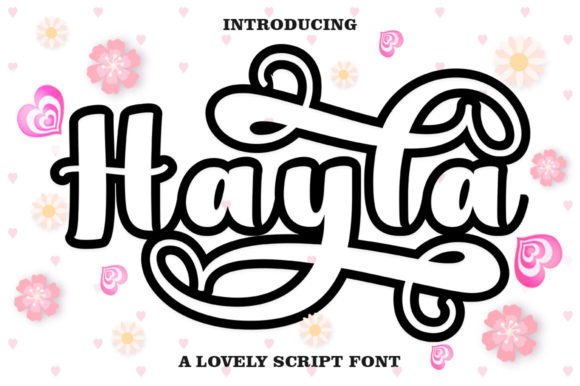
Hayla Outline is a handwritten font with a warm, romantic, and jovial feel. It has the charm of a real pen stroke, which makes it perfect for adding a human touch to digital projects. What caught my attention was how versatile it is—neither too casual nor too formal, it fits into a variety of design contexts.
Testing Hayla Outline in a Hero Section
I started by testing Hayla Outline in the hero section of the website. The goal was to create a welcoming headline that would draw users in. I placed it over a soft background image of the store’s products. The result was surprisingly effective. The font didn’t clash with the imagery; instead, it added a layer of personality that made the brand feel more approachable.
One thing I noticed right away was its legibility. Even though it's a script font, the spacing between letters and the clean strokes made it easy to read at larger sizes. This was important because the hero section is one of the first things visitors see, and readability can make or break the first impression.
Using Hayla Outline Across Different Elements
As I continued designing, I found that Hayla Outline worked well in several areas beyond just the headline. For example, I used it for section headings throughout the site. The font helped create a visual hierarchy without being overwhelming. It also looked great in call-to-action buttons, especially when paired with a contrasting color.
For the product pages, I used Hayla Outline in short phrases like “New Arrivals” and “Limited Edition.” These were placed above product grids, and they helped guide the user’s eye naturally through the content. The font didn’t distract from the products but instead enhanced the overall aesthetic.
In the blog section, I experimented with using Hayla Outline for post titles. Again, the results were positive. The font gave each entry a unique feel while maintaining consistency across the site. I made sure to keep body text in a simpler sans serif font to ensure readability wasn’t compromised.
Readability and Responsive Design
One of the biggest concerns when using a script font is readability, especially on mobile screens. I tested Hayla Outline on various screen sizes and found that it performed well. At smaller sizes, it remained legible, and I adjusted line spacing and letter spacing where necessary to maintain clarity.
I also considered how the font would look on dark and light backgrounds. On light backgrounds, it had a soft, elegant appearance. On darker tones, I used a slightly lighter version of the font to ensure it stood out without straining the eyes. This flexibility made it suitable for a wide range of design scenarios.
Font Pairing and Brand Consistency
To maintain a balanced look, I paired Hayla Outline with a clean sans serif font for body text. This combination provided a nice contrast between decorative and functional typography. It helped reinforce the brand’s identity without making the design feel cluttered.
I also checked the available styles and weights of Hayla Outline. While it’s primarily a display font, having access to alternates and variations allowed me to use it creatively in different parts of the layout. For instance, I used the lighter weight for subtle accents and the bolder weight for emphasis in headlines.
Before finalizing the design, I made sure to review the licensing information. Since this was a commercial project, I needed a font that supported multiple languages and had proper webfont availability. Hayla Outline met all these requirements, which made it a safe and reliable choice for the client’s needs.
Final Touches and User Experience
Overall, integrating Hayla Outline into the website helped elevate the brand’s visual identity. It brought warmth and personality to the design while maintaining a polished and professional feel. Users responded positively to the updated look, and I received feedback that the site now felt more inviting and cohesive.
Whether you're building a creative portfolio, an online store, or a coaching website, Hayla Outline offers a great way to add character to your digital assets. Its versatility, readability, and stylistic appeal make it a valuable addition to any designer’s toolkit.